
Indykite just Open-Sourced its standard-compliant Indykite Agent Skills repository for AI agents (including coding assistants).
The Indykite Platform is highly interactive, there are various ways to get connected knowledge in and out of it: through its capture API for example, or its knowledge queries or even through its native AuthZEN APi support. The knowledge queries, the ContXIQ product in particular, is a powerful tool that enables any authorized client to define and use custom queries to read and write knowledge directly to/from the platform in any desired way, with out-of-the-box fine-grained data-level protection. This is great, but how can a client AI agent learn how to use all these Indykite tools properly at runtime?
The traditional way would have been to let the client agent go through all the existing platform documentation, as linked above, or through our Developer Hub (here’s for example an excellent starting point to understand the Indykite platform: https://developer.indykite.com/guides/guide-products ), and then let it infer the proper usage for the task at hand. This would work, nevertheless this documentation is not written in any particular standardized format. If an agent wanted to learn the Indykite Platform, it would therefore need to bring the whole documentation into its context window and start processing it every time it needed to perform an action. It would then eventually infer the right section of the documentation to use for the task at hand, and follow these instructions to reach its set goal. This means that the calling agent’s underlying LLM model would essentially need to consume a lot of unnecessary tokens and perform a lot of inference to just be able to select a few useful documentation sections to use. Why read all these documents if only a handful are actually useful? This is quite wasteful, especially when the cost of AI inference is skyrocketing. There is a better way.
IndyKite Agent Skills.
What are Agent Skills?
Agent Skills are lightweight, standardized text conventions for writing Markdown files that aim at extending AI agent capabilities with specialized functionality. Invented and released by Anthropic in December 2025, their rapid rise (see Figure 1 below) have made agent-skills the de-facto standard for describing to AI agents how to reach pre-defined goals or to use systems, components or tools.
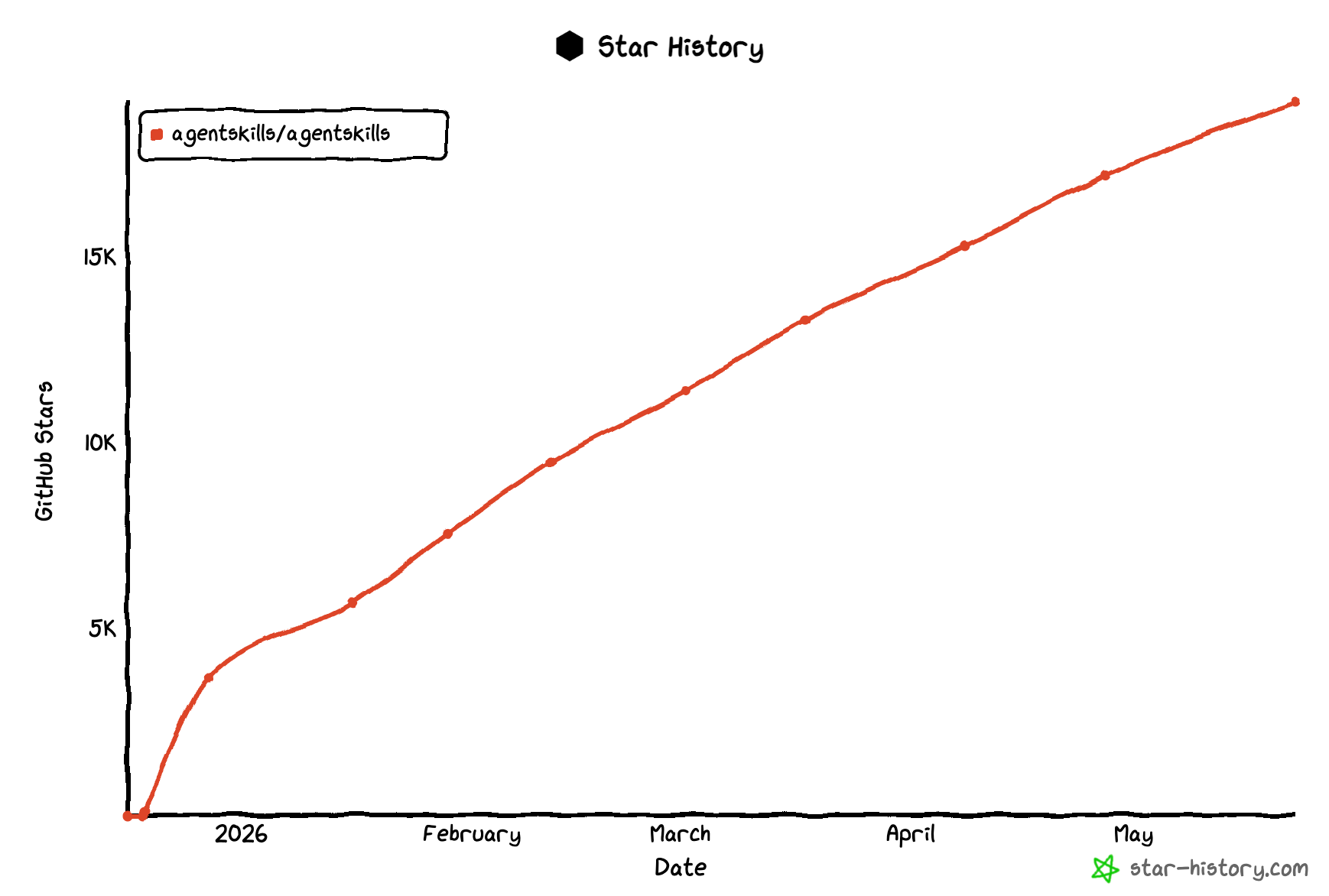
Figure 1 - The Github Star history of agent skills shows a rapid rise in popularity in just 6 months
In essence, agent-skills are detailed descriptions of how to perform pre-defined tasks, expressed as standardized Markdown (md) documents. The skills files are broken down by convention into several sections, from high-level descriptions of the functionality down to the nitty-gritty details of how to invoke or use any underlying component, system or tool, in order to accomplish the described goal. The trick here is that these agent-skills sections are lazily-loaded: the agents load the skills at runtime through selective disclosure, one section at a time, therefore ensuring that only a minimal amount of LLM tokens is necessary for every execution (see below).
The end goal of agent-skills are to reduce hallucinations and goal drift. Providing detailed instructions for undertaking pre-defined tasks ensures that the agents have proper guardrails for accomplishing their goals, and limits any “invention” or improvisation they may come-up with.
Agent-Skill files
The full agent-skill specification defines the following standardized folder structure for Skills files:
The main file is named SKILL.md, it describes the actual skill itself and provides all the details for using the underlying system. Agent-skills work as follows:
- Each agent skill has its own folder. A skill describes how to accomplish a certain goal, which often amounts to using certain underlying systems, components, tools or APIs. A skills provider will therefore publish as many agent-skills as goals or functionality it exposes to client Agents.
- The skills can be understood as detailed documentation on how to accomplish a given specific task, or the intended usage of a given underlying system API, Tool or exposed feature. It could also be seen as a very detailed LLM prompt. Agent-skills can describe a set of actions the agent must undertake in order to achieve a specific goal. Skills provide generic high-level descriptions, as well as very detailed instructions to follow or even code samples. Each skill thus describes one single goal or underlying functionality.
- Each skill is described in its own folder. The name of the folder storing the Skill is semantically meaningful. It is made of keywords separated by dashes; a client agent could therefore pre-select certain skills based on these names alone.
Skill File format
Within any given skill folder, the skill file has the following format:
- The Frontmatter: A high level description of the skill, expressed as YAML property/value pairs. The frontmatter contains predefined, standard metadata properties that must be specified for each skill; at the very least a skill Name and Description. Example:
- The Body Content: The actual description of the skills. This is a free-from section, the only recommendation here is that the description should be useful for the client Agent to understand how to accomplish a certain goal, or use some underlying functionality. The specification recommends detailing the following sections:
- Step-by-step instructions
- Examples of inputs and outputs
- Common edge cases
Optional Directories
The Skills descriptions can be complemented by additional information or files. These can be supplied in the following folders:
/scripts
Contains executable programs or scripts that the agent can run directly. These are properly documented and self-contained, a client agent should therefore be able to easily run them.
/references
Provides additional very detailed documentation that a client agent may choose to read to understand how to use any given underlying functionality.
/assets
This folder contains any additional files that could be useful to the client Agent. This could be file templates, code samples, images, diagrams, to anything that can be of use.
Selective Disclosure
Using Selective Disclosure, client agents are expected to lazily load at runtime the skills and their descriptions, section by section. This ensures that the agents only use a limited amount of Tokens, by only drilling-down in the lengthy documentation sections that are really relevant to their goals, ignoring all the irrelevant documentation.
Thus client agents must:
- First read all the skills made available to them; i.e., read all the exposed folder names. These names can be used to pre-select certain folders of interest; then
- The client agent can just read the Frontmatter of every pre-selected skill, and use the skill names and descriptions present there to select the skill that best matches its current goal.
- Once the agent has selected a skill to use, it can then further drill-down on that specific skill Body, and any additionally proved files in order to learn how to use it.
The Indykite Skills
The Indykite skills can be found here: https://github.com/indykite/skills . They are also fully documented there.
The repo is open source and is community driven, provided with an Apache 2.0 license. The skills are grouped into a few categories:
- CIQ skills: These skills utilize the ContX IQ product, enabling agents to define and use custom Knowledge Queries to read and write knowledge to/from the Indykite Knowledge Graph with fine-grained data-level protection. They are used for purposes such as fetching agentic workflow definitions, discovering knowledge, and persisting context.
- Agent Gateway skills: These skills are related to the governance of agentic workflows enforced by the Indykite Agent Gateway (IAG). The IAG is a core component that acts as a proxy to enforce access controls, filter agent skills, track user-to-agent delegation chains, and ensure compliance with open standards like A2A and OAuth2.
- MCP Server skills: These skills leverage the Indykite MCP Server, a compliant MCP Tool and Resource server designed for AI agents. The server acts as a wrapper around the AuthZEN Resource and ContX IQ APIs, allowing client agents to run authorization queries (AuthZEN Evaluations) and interact with the Knowledge Graph via Knowledge Queries.
One of the main goals of these Indykite skills is to enhance coding assistants, such as Claude Code. All details of how to set up these skills are provided in the README files. In any case, these skills must be installed locally to the agent using them.
Conclusion
By leveraging Indykite Agent Skills, you can drastically reduce token consumption and eliminate goal drift for your AI agents when interacting with the Indykite Platform. As an open-source project under an Apache 2.0 license, we invite you to use these skills, contribute your own, and help expand this vital standard for agent-to-platform interaction. Start building smarter agents today!

.webp)