
Authorization, in general, is confusing, especially for those who don’t usually evolve in Identity and Access management (IAM) circles. And then there’s Model Context Protocol (MCP) Authorization, which can be extremely confusing for developers not privy to the intricacies of the various OAuth2 standards involved. Let’s try to make this part of the MCP Specification a little clearer, and identify what’s missing in it…
OAuth2 roles in MCP
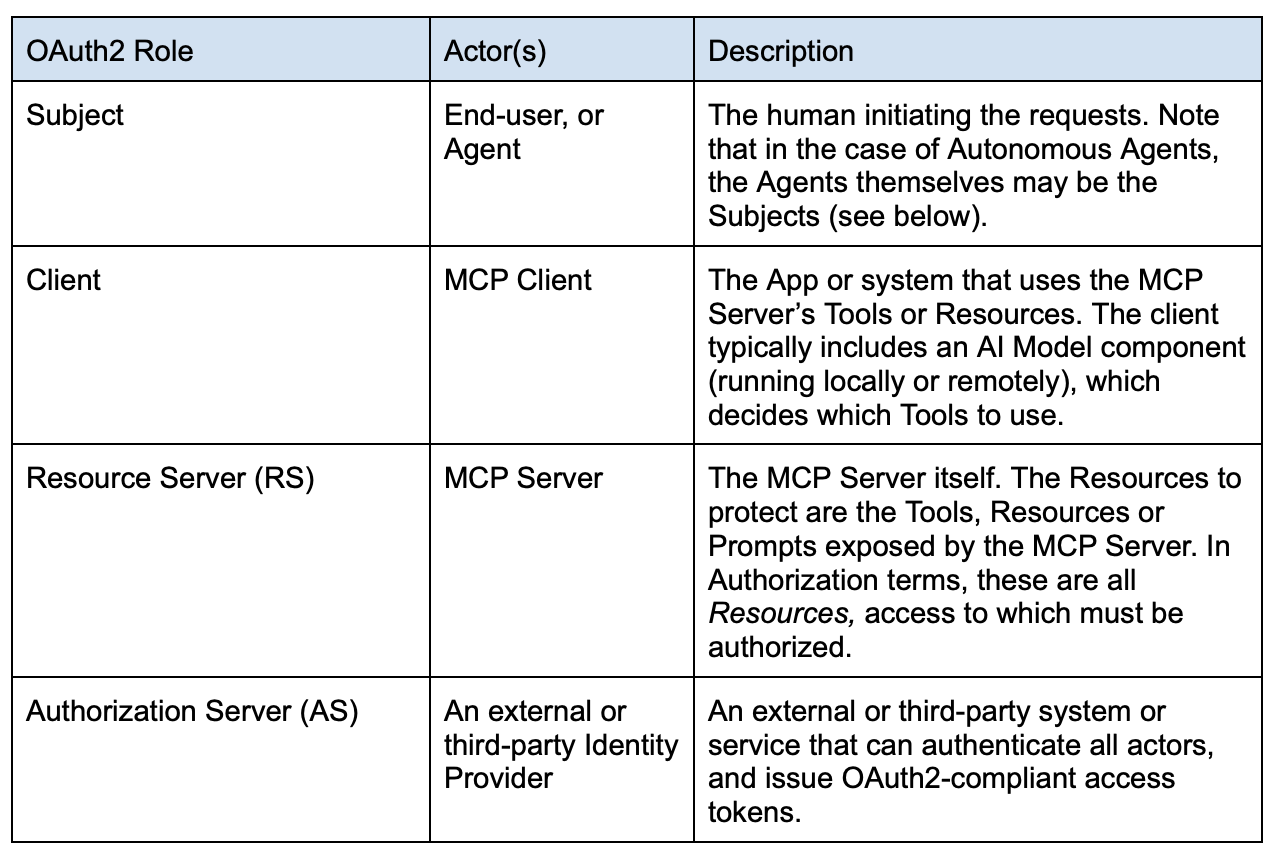
MCP adopted OAuth2 as its standard for authorization. OAuth2 uses standardized processing flows that usually involve 4 actors : the Subject, the Client, the Authorization Server and the Resource Server. These roles can be a major source of confusion, as the same actual system can behave differently from one use-case to another. We thus first need to properly define the OAuth2 roles of each of the actors in the MCP system…
About OAuth Subjects
Determining the proper Subject of an MCP request can be tricky, because as stated, both the prompting end-user OR the AI Model itself could be the actual Actor invoking the MCP Tools. For instance, it is possible to imagine use-cases where the Agent doesn't react to prompts or API calls directly initiated by human actors, but instead reacts autonomously to certain events or to environmental changes. Consider, for example, an Agent trained to read logs files, and reacting in real-time to some concerning events it finds there. That agent could then autonomously trigger notifications and/or remediation actions by selecting the right set(s) of tools to use. In those cases the actor, the Agent itself, is the Subject for all authorization intents and purposes.
Nevertheless, in certain verticals or regulated environments (banks for example), the responsibility of an Agent’s action should always fall on a human. In those cases, a default “owner” for the agent can be assigned, and all potential remediations for an Agent’s action can then be tied back to that owner.
In any case, the Subject will be identified by the sub claim in the access_token presented for any MCP Tool use. The Subject is the entity which access entitlements will be evaluated during the Authorization step (see further below).
The MCP OAuth2 Authorization flow
Registration
For any of these flows to work, all actors must be known, i.e., registered with both the AS and any other system protecting the RS. This could be difficult in the cases where the MCP server is exposed to the Internet and can accept client requests from any external domain. In such cases, Just-In-Time provisioning (JIT) of the Subjects can be implemented, if the AS supports it, as well as dynamic Client registration (through the RFC 7591 specification). These are made explicit in the overall flow section below.
It is also possible (and more likely in Enterprise scenarios) that Subjects and Clients are all pre-registered with all systems involved via out-of-band processes.
High-Level Description
The Access Token
The MCP specification relies on the 3-legged authorization_code OAuth2 flow. The MCP Client first requests a Code from the AS, then exchanges the code for a proper access_token. Getting the token therefore requires the Client to make two calls to the AS:
- Request a code, by first authenticating itself with the AS as the Client. This step enables the AS to optionally communicate directly with the human Subject to get an optional human approval, if necessary. Then,
- Exchanging the code for a proper access_token.
But there is a problem. If the MCP Clients and Servers are in different Trust domains across the Internet, and don’t really “know” each other, then how does the MCP Client know which AS to contact to get a right access_token to use for the Tool it tries to access?
To solve this problem, the MCP specification requires all parties to use standard OAuth2 Metadata documents:
- RFC 9728 specifies the Protected Resource Metadata Document. This document describes the various configurations supported by the RS (the MCP server), and in particular provides the list of Authorization Servers that can be used with it.
- RFC 8414 defines the AS Metadata Document. It lists the URL Endpoints of the AS for all the OAuth2 flows it supports.
These two documents enable MCP Clients to discover dynamically at runtime all the details pertaining to the AS, in particular which AS to use and the list of its OAuth2 endpoint URLs.
The missing piece: Dynamic Authorization and AuthZEN
Thus, the OAuth2 authorization_code flow enables the following things:
- Authenticate the MCP Client
- Authenticate the Subject
- Optionally request an approval from the User Subject
- Optionally let the AS augment the access_token with claims, such as scope, that can then be used by the RS to further restrict access to its resources.
Nevertheless the OAuth2 flows were created for human interactions and static Clients and RS’s. They were not made at all to support highly dynamic Agentic AI environments. MCP Clients can utilize any Remote MCP Servers, it is therefore impossible for an AS protecting a set of MCP Servers to know what a newly registered MCP Client should have access to. New MCP Clients can only be granted default, high-level access rights… These coarse entitlements may not be sufficient if the MCP tools grant access to sensitive backend resources, such as documents or data tables. Protecting these sensitive backend resources requires fine grained authorization, which must be done at the RS level. This piece is completely missing in the MCP Specification… For this, we need OpenID AuthZEN 1.0, as detailed below.
PEP / PDP architecture
To understand AuthZEN, we need to look at the concepts of Policy Enforcement Point (PEP) and Policy Decision Point (PDP), which emerged in the early 2000’s with the XACML specification, and were formalized further in NIST’s Zero Trust reference architecture (NIST SP 800-207).
The PEP/PDP architecture is the basis of all real-time dynamic authorization and Zero Trust, and the only way to implement its “Never trust, Always verify” precept.
Instead of performing authorization once at authentication time, like in the OAuth2 flows, every single request for a resource must be verified, every single time.
To achieve this, Resource Server implementers must build or use a PEP. The PEP is a proxy, API Gateway or simple if / then/ else code block that redirects all incoming requests to a PDP for evaluation.
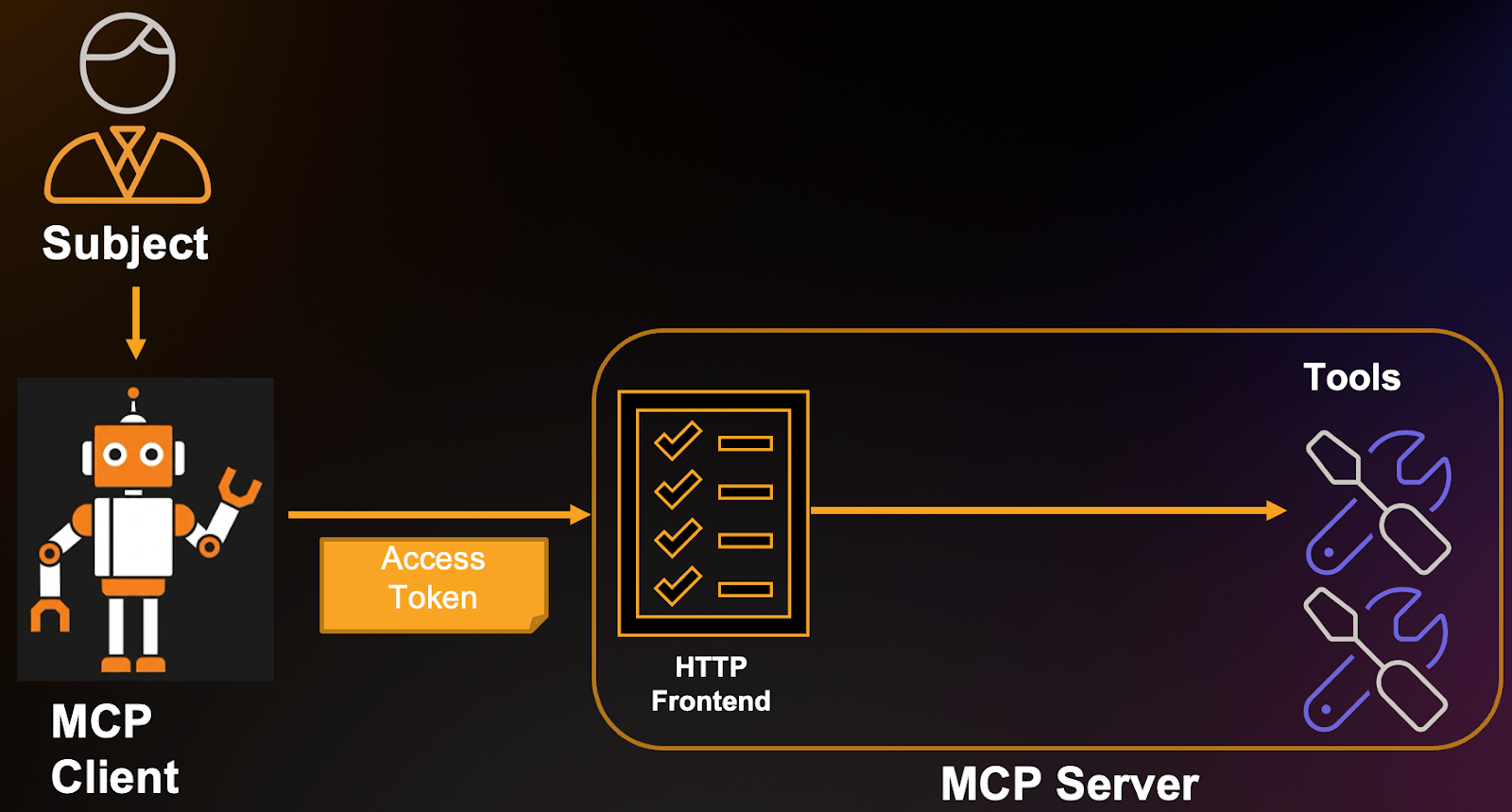
Figure 1 below shows the usual high-level MCP interaction between the Subject, Client and MCP Server. The Server hosts a number of tools that the MCP Client tries to access:
The idea is to insert a PEP in front of the Tools, as depicted in Figure 2 below; i.e.,
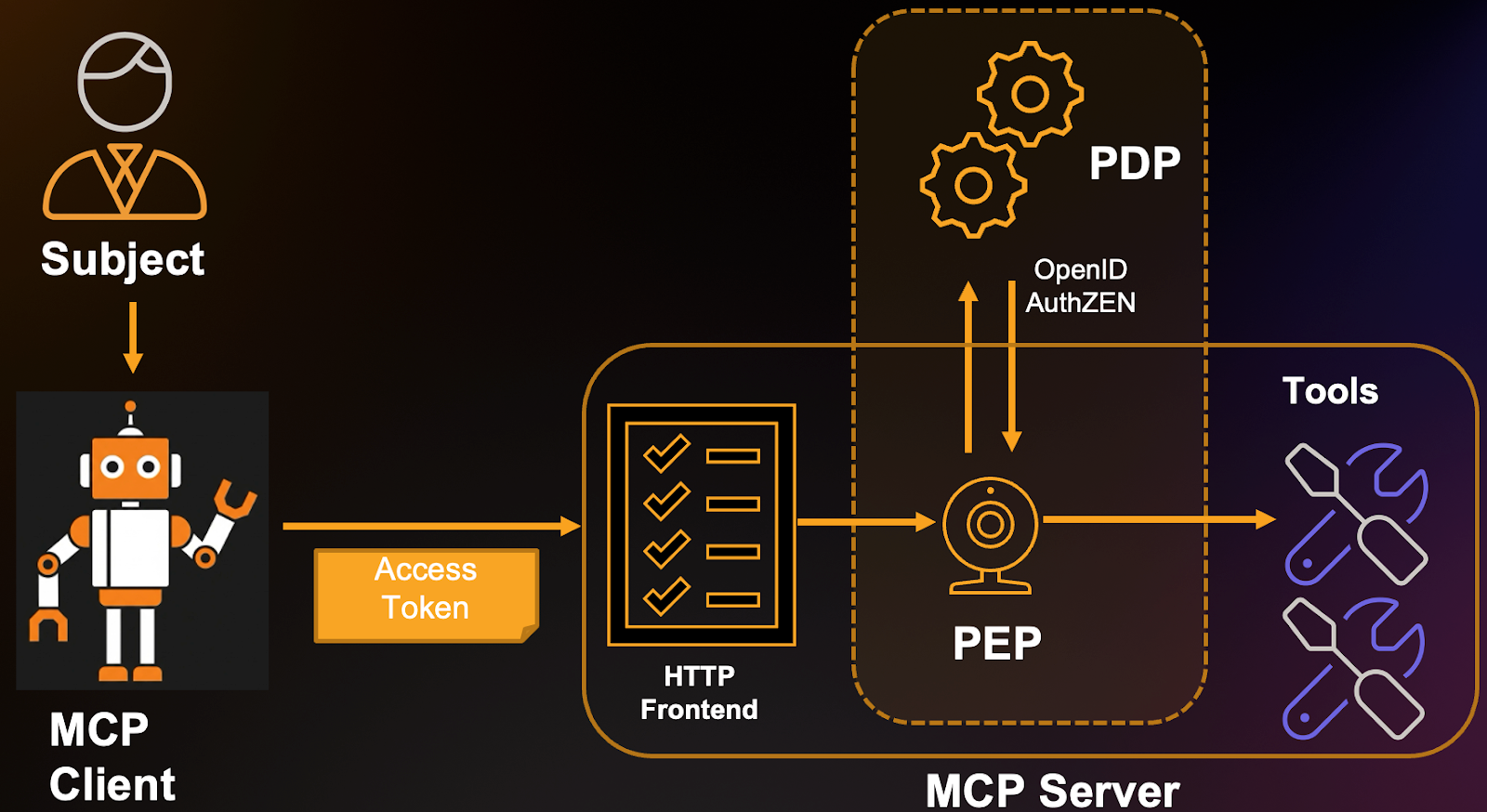
- The PEP must be inserted “in front of” every MCP Server Tool or Resource. That is, a code wrapper must be added to catch all incoming requests and evaluate them before actually executing the Tool or Resource functions.
- The role of the PEP is to redirect all such requests to the Policy Decision Point (PDP). The PDP is a rules engine programmed with deterministic Access Policies. These can be more or less complex conditions that are expressed using some Authorization Model, such as ABAC, ReBAC, RBAC or other. The PDP will evaluate the requests against these rules and Grant or Deny access to the tools.
- The Responses are returned to the PEP, which then lets the requests proceed or returns an Unauthorized error.
- The communication protocol between PEP and PDP is defined in the OpenID AuthZEN specification.
- AuthZEN enables the MCP Server to use any AuthZEN-compliant external PDP.
- Many AuthZEN compliant off-the-shelf solutions exist (such as Indykite), and should be used.
Externalizing authorization enables central management of policies, compliance to laws and regulations and enables administrators to define very fine grained authorization for the MCP Tools. This architecture constitutes best practices and the only way, really, to implement Zero-Trust precepts.
Putting it all together: full MCP authorization flow
Given all these, the full MCP Authorization flow is as follows (refer to the Authorization Flow Steps diagram of the MCP Specification as a reference):
- The User accesses the MCP Client somehow (via prompt, API call other).
Note: MCP does not specify how the User authenticates with the MCP Client, that part is left at the discretion of the MCP Client implementers.
- The MCP Client’s AI model determines it must use some tool(s) in order to accomplish the goal set by the Subject user.
- The MCP Client makes the corresponding MCP request to the MCP Server. This initial request contains no token at all.
- The MCP Server sees no access_token in the incoming request, and therefore returns an HTTP 401 Unauthorized error with a WWW-Authenticate Header. The header will contain a resource_metadata Bearer header that points to the location of the MCP Server’s Protected Resource Metadata Document.
E.g., Unauthorized response from MCP Server:
HTTP/1.1 401 Unauthorized
WWW-Authenticate: Bearer resource_metadata=
"https://mcp.example.com/mcp/v1/<projectID>/.well-known/oauth-protected-resource
- The MCP Client extracts the resource_metadata from the response header, then GETs that document:
GET https://mcp.example.com/mcp/v1/<projectID>/.well-known/oauth-protected-resource HTTP/1.1 Host: mcp.example.com
The response will look something like this:
- The MCP Client must then validate this returned metadata. Validation is described in section 3.3 of RFC 9728 but in essence, the value of the "resource" response property must be the same as the URL of the MCP Server the Client is accessing. Optionally the metadata can be signed by the MCP Server. In that case, the signature must also be validated by the Client (this means the Client and Server “knew” each other beforehand, and exchanged certificates).
- The MCP Client chooses an AS to use from the provided "authorization_servers" list, and fetches the AS Metadata Document from there:
GET https://as1.example.com/.well-known/oauth-authorization-server HTTP/1.1
Host: example.com
The response from the AS will be similar to the example below:
HTTP/1.1 200 OK
Content-Type: application/json
The MCP Client now knows both the "authorization_endpoint" and "token_endpoint" to use to get an access_token from this AS.
- The MCP Client initiates an OAuth2 flow using the AS’s "authorization_endpoint". This request MUST include a resource parameter specifying the URL of the requested tool(s). For example, using PKCE (note: always use PKCE), requesting access to two MCP tools :
HTTP/1.1
GET https://server.example.com/authorize?response_type=code
&client_id=s6BhdRkqt3
&state=tNwzQ87pC6llebpmac_IDeeq-mCR2wLDYljHUZUAWuI
&redirect_uri=https%3A%2F%2Fclient.example.org%2Fmcp
&scope=tools%3Atool1%20tools%3Atool2
&resource=https%3A%2F%2Fmcp.example.com%2Ftools%2Ftool1
&resource=https%3A%2F%mcp.example.com%2Ftools%2Ftool2
Host: authorization-server.example.com
The AS will then proceed to:
- (Optionally perform dynamic Client Registration, if the MCP Client was not yet known.)
- Authenticate the MCP Client.
- Authenticate the Subject. This will likely involve a back-and-forth flow with the user-agent (their browser, for example), to request the user’s credentials. This step may use multi-factor authentication.
- (Optionally auto-provision the Subject, if not already known)
- (Optionally request the User’s approval for the MCP Client to use the requested MCP Server resource.)
- Return an authorization_code to the MCP Client.
- The MCP Client can then package the call to exchange the code for the
access_token:
HTTP/1.1
POST https://as1.example.com/token Host: as1.example.com
Authorization: Basic czZCaGRSa3F0Mzpoc3FFelFsVW9IQUU5cHg0RlNyNHlJ
Content-Type: application/x-www-form-urlencoded
grant_type=authorization_code
&redirect_uri=https%3A%2F%2Fclient.example.org%2Fmcp
&code=10esc29BWC2qZB0acc9v8zAv9ltc2pko105tQauZ
&resource=https%3A%2F%2Fmcp.example.com%2Ftools%2Ftool1
&resource=https%3A%2F%2Fmcp.example.com%2Ftools%2Ftool2
The MCP client will then receive the access_token with the requested scopes and resources. In this example, the scopes grant access to tool1 and tool2 of the MCP Server. These scopes grant coarse/high level only access to the tools.
Note: that the access token’s audience claim will hold the value(s) of the resources requested in step 8 above. The token will therefore only be usable there. Optionally, the AS may also have augmented the token with additional custom claims, depending on the implementation. In any case, the response should be as follows:
HTTP/1.1 200 OK
Content-Type: application/json
Cache-Control: no-cache, no-store
- The MCP Client can now use access_token to invoke either tool1 or tool2.
- Nevertheless these tools may potentially grant access to confidential or sensitive data from their backend. A further, fine-grained authorization step is therefore necessary. The MCP server tool, now acting as a PEP, packages an AuthZEN Request to an external PDP (such as Indykite ). For example, the tool1 function can access some file system documents in the backend service, some of which may be sensitive and not presentable to all Subjects. It therefore needs to fetch only those documents that the Subject can actually access. tool1 thus performs an AuthZEN Resource Search request:
I.e., “Which documents can Subject Alice read?” :
The response may be as follows:
- The tool can now package its response to the MCP Client, the whole flow, down to the fine data elements has been authorized.

.webp)